
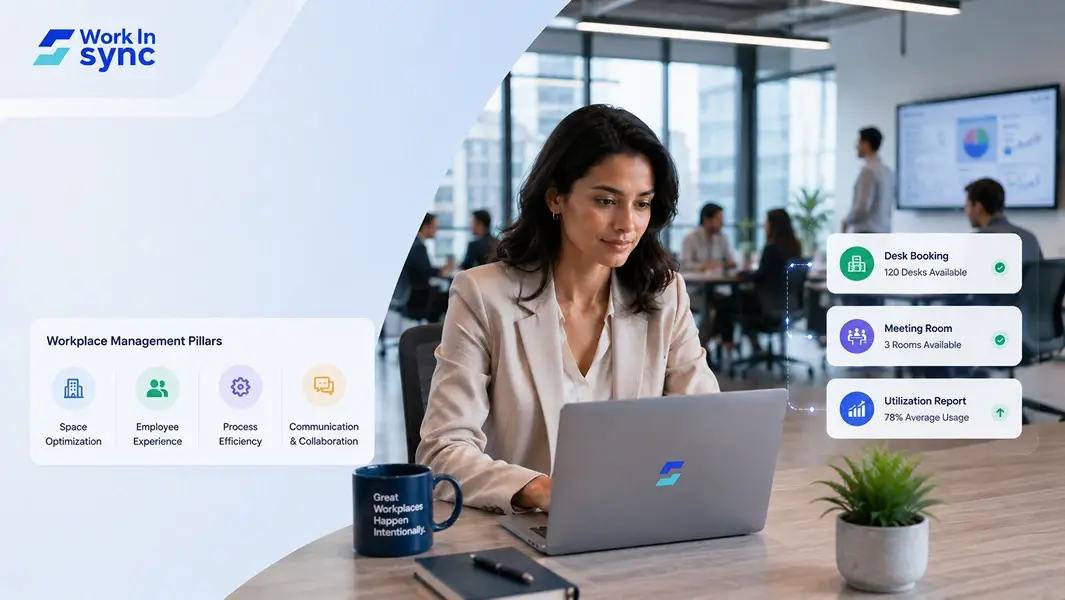
What is Workplace Management? Everything You Need to Know
Workplace management is the process of organizing your office environment, resources, and employee activities to maximize efficiency and support daily operations. Effective workplace management balances operational needs with employee satisfaction, helping you create a productive and comfortable work setting.
By implementing the right strategies and tools, you can optimize space, streamline workflows, and improve communication across your team. Understanding these principles allows you to make informed decisions that enhance overall business performance and employee well-being.
This guide offers practical insights and proven methods for managing your workplace effectively, whether in a physical office or hybrid environment. You’ll learn how to align people, processes, and technology for a smoother work experience.
What Is Workplace Management?
Workplace management is the process you use to organize, operate, and maintain your office or work environment. It involves coordinating people, tasks, resources, and facilities to create an efficient and productive space.
You focus on streamlining workflows, optimizing space utilization, and ensuring employees have what they need to perform their duties well. Effective workplace management balances operational efficiency with employee satisfaction.
Key elements you manage include:
Physical office layout and space planning
Resource allocation and equipment maintenance
Employee performance and engagement
Task and workflow coordination
By managing these areas, you improve overall productivity, reduce costs, and foster a positive work atmosphere. This also helps your organization respond flexibly to changing needs and technologies.
Workplace management requires a blend of strategy and hands-on coordination. You must anticipate operational challenges while supporting your team’s well-being.
Understanding how your spaces function and how people interact within them allows you to make informed decisions.
Benefits Of Workplace Management
Effective workplace management improves how you organize resources, optimize employee performance, and maintain a productive work environment. It directly impacts efficiency, satisfaction, and the overall balance between work and personal life.
Examples Of Workplace Management Across Industries
Tech companies focus on flexible workspaces and remote work policies to support work-life balance. Optimized resource booking (desk booking, meeting room booking, parking booking, etc) tools and project management systems increase team collaboration and job satisfaction.
In healthcare, workplace management ensures access control to sensitive areas, proper audit of visitors improving both patient care and employee satisfaction. Efficient resource allocation, like medical equipment availability, boosts workplace performance.
In retail, managing floor layouts and inventory helps you enhance customer flow and reduce operational costs. Clear task assignments support employee productivity and workplace efficiency.
By tailoring workplace management to your industry’s needs, you create a more engaged and effective workforce.
4 Reasons Workplace Management Matters
Effective workplace management directly impacts how well your organization uses space, controls costs, and enhances the experience of employees on-site and remote. It plays a crucial role in creating an environment where hybrid work thrives and operational efficiency improves.
Real Estate Optimization
Managing your workplace well means making smart decisions about the physical space your company occupies. You can reduce unused or underutilized areas by tracking how often rooms, desks, and meeting spaces are actually used.
This is especially important in a hybrid workplace where employees split time between office and remote work. By optimizing real estate, you avoid paying for excess square footage and can adapt spaces to support hybrid teams, such as flexible desks or collaboration zones.
Using data-driven insights, you can plan spaces that fit your workforce’s real needs, improving density without overcrowding. This ensures every corner of your workplace adds value rather than being a sunk cost.
Cost Savings
Workplace management can significantly lower your operational costs. By consolidating space, reducing energy consumption, and avoiding unnecessary leases, you save money that can be reinvested elsewhere.
You also cut expenses related to maintaining spaces that aren’t used efficiently. For example, scheduling room usage and controlling utilities during off-hours reduces overhead.
In a hybrid or remote work model, managing resources carefully means you only pay for what your employees actually use. This prevents wasted spending on desks and offices nobody occupies, enhancing your company’s financial health.
Better Workplace Experiences
Your workplace environment shapes how employees interact and collaborate. Effective management ensures spaces support different work styles, from focused individual work to team meetings.
By providing well-maintained, adaptable areas, you create a space where hybrid teams can seamlessly transition between remote and office work. This includes easy room booking, clear desk policies, and technology that supports virtual and in-person communication.
When employees find the workplace comfortable and functional, operational efficiency improves. Smooth workflows and minimized distractions contribute to better overall productivity and satisfaction while reducing friction in daily routines.
Better Employee Experiences
Workplace management isn’t just about space; it’s about people. Your approach influences employee engagement by aligning the environment with their needs and preferences.
A hybrid workplace demands flexibility, so creating options for remote work and adaptable office setups increases employee satisfaction. When employees control where and how they work, you boost productivity and reduce burnout.
Engaged employees feel supported by their environment, which enhances retention and attracts talent. By actively managing resources and feedback, you foster a culture where teams feel valued and equipped to deliver their best, no matter where they work.
Common Considerations For Workplace Management
When managing a workplace, space planning is essential. You need to design your office layout for efficient workflow and comfort. Proper space utilization ensures you make the most of your available area without overcrowding or wasted zones.
Security measures must be in place to protect your employees and sensitive information. This includes controlling access, monitoring, and ensuring compliance with legal and industry standards. Staying compliant helps you avoid fines and maintain a trustworthy environment.
Your facilities teams play a crucial role in daily operations. Coordinating with them ensures smooth maintenance, repairs, and cleaning, all vital for a functional workspace.
Waste reduction is another key factor. You should implement policies to minimize waste production and encourage recycling. This supports sustainability goals and can reduce operating costs.
Here’s a quick checklist of considerations to guide you:
Consideration | Importance | Action Points |
|---|---|---|
Space Planning | Optimize layout for productivity | Create flexible, ergonomic spaces |
Space Utilization | Maximize use of physical office space | Track occupancy and adapt accordingly |
Security | Protect assets and personnel | Implement access controls and monitoring |
Compliance | Meet legal and safety regulations | Regular audits and training |
Facilities Teams | Maintain building functionality | Schedule regular maintenance |
Waste Reduction | Support sustainability and cost savings | Promote recycling and reduce waste |
Focusing on these areas will help you create a workplace that is efficient, safe, and adaptable to changing needs. Efficient communication with your teams about these priorities is vital for success.
Best Practices For Workplace Management
To manage your workplace effectively, start by developing clear workplace management strategies that align with your organization’s goals. These strategies should focus on optimizing space, technology, and employee workflows to enhance productivity.
Implementing a solid workplace strategy means prioritizing flexibility. This includes designing your office layout and policies to support both in-person and remote work. Flexibility is key to adapting to different work styles and needs.
If your organization uses hybrid work policies, communicate them clearly to your team. Define expectations for office days, remote work, and collaboration practices to avoid confusion. Transparency helps everyone stay aligned.
Focus on creating hybrid work strategies that support seamless transitions between remote and office work. Use tools for scheduling, space booking, and virtual meetings to maintain productivity and teamwork regardless of location.
Tracking employee performance and satisfaction is essential. Use regular feedback and data to adjust your workplace management approach. This continuous improvement benefits both your staff and business outcomes.
Stress the importance of inclusivity and well-being in your strategies. A positive work environment encourages engagement and reduces turnover, directly impacting your organization’s success.
Best Practice | Key Action |
|---|---|
Clear communication | Set expectations for hybrid work |
Flexible workspace design | Support in-person and remote work |
Technology integration | Use resource booking (WorkInSync) and collaboration tools |
Regular feedback | Adjust strategies based on data |
Employee well-being focus | Foster positive work culture |
Adopting these practices will help you create an efficient and adaptable workplace that meets current demands and future challenges.
What Is An Integrated Workplace Management System?
An Integrated Workplace Management System (IWMS) is a software platform that centralizes your management of real estate, facilities, and workplace resources. It unifies these areas into a single, dynamic system, making your processes more efficient.
With an IWMS, you integrate multiple disciplines such as space management, maintenance, asset tracking, and real estate portfolio management. This integration helps you oversee your entire workplace ecosystem from one place.
The technology integration within an IWMS allows you to use a centralized database, which simplifies data handling and ensures consistency across departments. This means fewer errors and better collaboration in your organization.
Common benefits you will notice include real-time decision-making, improved operational efficiency, and optimized resource allocation. You can also leverage consolidated data for reporting, helping your team plan space usage and facilities services more accurately.
Here is a brief overview of key functions an IWMS typically covers:
Core Functions | Description |
|---|---|
Space Management | Optimize office layouts and occupancy |
Facility Management | Schedule maintenance and manage assets |
Real Estate Portfolio Management | Track leases and property expenses |
Asset Management | Monitor and maintain physical assets |
Reporting and Analytics | Use data consolidated from all systems |
Using an IWMS helps you streamline your workplace operations by replacing disparate tools with one integrated solution. This can improve the day-to-day experience for both facility managers and employees alike.
What Can You Do With A Workplace Management Software?
With workplace management software, you gain centralized control over many daily operations. You can easily manage access control to secure your facilities, ensuring only authorized personnel enter specific areas. This improves security without adding complexity to your workflow.
Booking systems are a core feature. You can handle meeting room scheduling and desk booking or hot desking seamlessly. This reduces conflicts and maximizes space usage, especially useful in hybrid or flexible work environments.
Visitor management features allow you to track guests efficiently. You can preregister visitors, monitor arrivals, and keep records securely, improving both safety and compliance.
You can also monitor occupancy data to understand office space utilization trends. This information helps you optimize your office layout and resources based on actual use.
Workforce analytics give you insights into employee patterns and productivity. This allows you to make data-driven decisions that improve operations and employee satisfaction.
Integration with communication tools like Microsoft Teams and Slack keeps your team aligned. You can receive updates, book spaces, and manage resources directly within the platforms your team already uses.
Key Features | Benefits |
|---|---|
Access Control | Enhanced security |
Meeting Room Scheduling | Efficient space use |
Desk Booking/Hot-Desking | Flexibility in workspace allocation |
Visitor Management | Improved safety and compliance |
Occupancy Data | Data-driven resource optimization |
Maintenance Requests | Faster issue resolution |
Workforce Analytics | Better operational decisions |
This blend of features makes workplace management software a critical tool for modern businesses aiming to operate smoothly and securely.
How To Choose The Right Integrated Workplace Management Software For Your Business?
Start by identifying your core business needs. Consider what aspects of workplace management, such as space utilization, maintenance, real estate, or sustainability, require improvement or automation.
Next, evaluate software features against your requirements. Focus on capabilities like real-time occupancy data, asset tracking, and reporting tools that align with your operational goals.
Consider usability and integration. The software should be user-friendly for all teams and integrate smoothly with your existing systems to avoid disruptions.
Budget is critical. Balance cost against the benefits and scalability of the solution to ensure it fits your current and future needs.
Use this checklist when comparing options:
Criteria | Questions to Ask |
|---|---|
Features | Does it support space optimization and maintenance? |
User Experience | Is the interface intuitive for your staff? |
Integration | Can it connect with your current software? |
Support and Training | What customer support and training are offered? |
Cost | Are pricing and licensing manageable within your budget? |
Prioritize software that offers clear data insights to improve decision-making and resource efficiency. Choosing the right IWMS will help you manage your facilities effectively without adding complexity.
The 5 Ways Workplace Management Software Can Benefit Your Company
Using workplace management software can bring measurable improvements to how your business operates daily. It helps you coordinate space, resources, and people more efficiently.
1. Improved Space Utilization
You can track and optimize how your office space is used. This reduces wasted areas and ensures desks, meeting rooms, and common spaces are booked only when needed.
2. Enhanced Employee Experience
Smart desk booking and visitor management tools let your employees reserve work areas easily. This convenience supports hybrid and flexible work models effectively.
3. Centralized Operations
The software acts as a hub to manage workflows, deliveries, and visitor check-ins. Having all this information in one place improves transparency and reduces administrative workload.
4. Data-Driven Insights
You gain access to reporting features that highlight usage patterns and operational bottlenecks. This data helps you make informed decisions about workplace policies and design.
5. Cost Efficiency
By optimizing resources and automating routine tasks, you can cut down operational expenses. Efficient space management often leads to savings on real estate and facility costs.
Benefit | Impact |
|---|---|
Space Utilization | Reduces wasted office space |
Employee Experience | Simplifies bookings and improves flexibility |
Centralized Control | Streamlines administrative tasks |
Data Insights | Informs better decision-making |
Cost Efficiency | Lowers overhead through optimized resource use |
Adopting workplace management software can align your business operations with the needs of a modern workforce.
Simplify Workplace Management With WorkInSync
WorkInSync helps you manage hybrid and onsite workplaces effortlessly. It offers tools to book desks, meeting rooms, parking spaces, and even manage visitors, all through an easy-to-use interface. This reduces scheduling conflicts and maximizes your workspace usage. You can access real-time availability, which helps you plan your day without unnecessary back-and-forth.
Here’s what you get with WorkInSync:
Desk and meeting room booking with visual floor plans
Visitor and parking management to control access and resources
Workspace utilization analytics to monitor and optimize office capacity
Using WorkInSync, you can improve collaboration while ensuring safety in your workplace. The system integrates with 45+ tools and solutions like Microsoft Teams, Slack, Google Calendar, making it simpler to adopt without disrupting your existing workflows.
For a detailed overview of its features and benefits, explore the WorkInSync workplace management platform.







Download Our App


 MoveInSync 2026, All rights reserved